

Claude Code plugin
Install Flung in Claude Code as a plugin: the hosted MCP server signed in with your browser, four skills that draft, schedule, connect and check, and a quiet hook that offers a release post after you tag.
- Claude Code
TL;DR
| Question | Answer |
|---|---|
| How do I install it? | Two commands inside Claude Code: add the marketplace, then install flung@flung. |
| What does it need? | A Flung account (the free plan works), and Node 18 or newer for the hook. No API key. |
| How does it sign in? | With OAuth: your browser opens Flung's sign-in, and you approve the workspace Claude may use. |
| What does it add? | The Flung MCP server, the skills /flung:post, /flung:connect, /flung:release-post and /flung:status, and a release hook. |
| Does it post by itself? | No. Every skill shows the draft and asks before it schedules anything, and connecting an account always needs you on the platform's own page. |
| Not on Claude Code? | Add the MCP server to your client instead: Connect an AI agent. |
What it is
The plugin is a package for Claude Code that holds three things. The MCP server, at the address every client uses, so Claude has all of Flung's tools. Four skills, which tell Claude how to do a Flung job well: one version of a post per platform within its limit, the time passed as you said it, nothing scheduled until you say yes. And a hook, which notices when Claude makes a release and offers to announce it.
It is open source, on GitHub at flung-official/flung-claude-plugin (opens in a new tab).
Install
Inside Claude Code, add the marketplace, then install the plugin from it:
/plugin marketplace add flung-official/flung-claude-plugin/plugin install flung@flungRestart Claude Code when it asks. The plugin adds the Flung server for you, as if you had added this to your MCP settings:
{ "mcpServers": { "flung": { "type": "http", "url": "https://mcp.flung.dev/mcp-oauth" } }}If you added the server yourself before, remove that one, so Claude sees one set of tools:
claude mcp remove flungSign in
The plugin holds no key. Claude Code asks you to sign in the first time it needs Flung; to do it now, run:
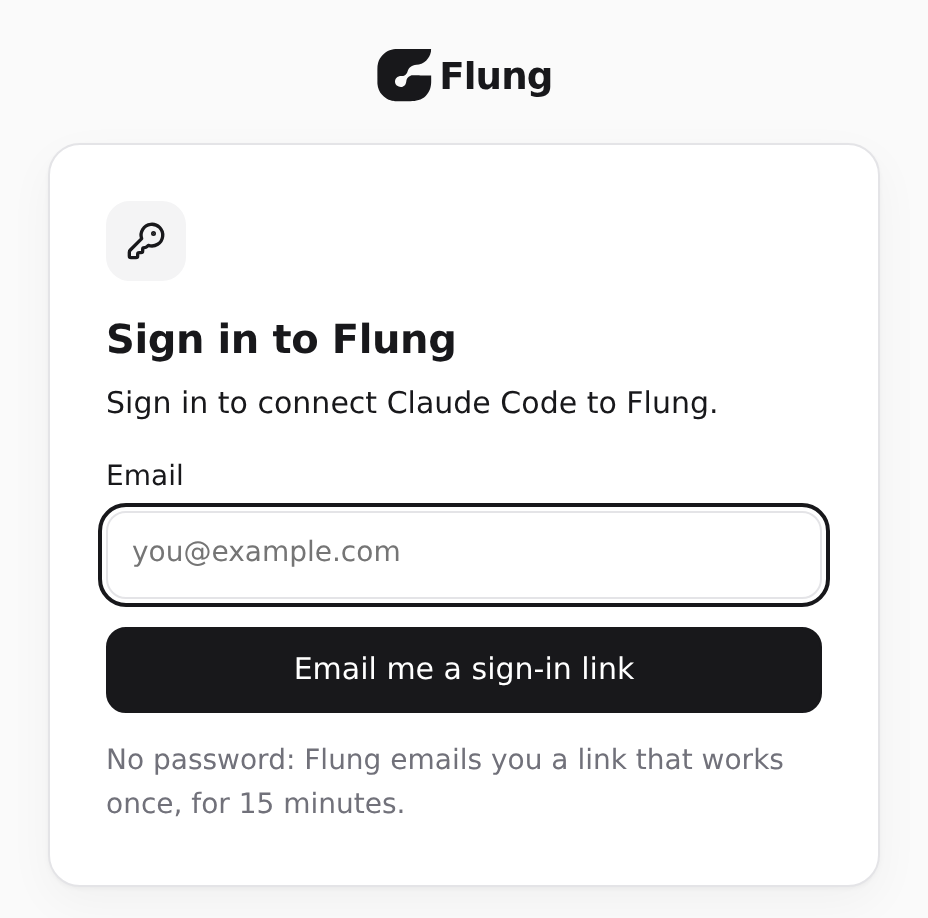
/mcpPick flung and choose Authenticate. Your browser opens Flung's sign-in: enter your email and open the link Flung sends you. There is no password.
Then pick the workspace Claude may use and approve it. Claude Code carries on, signed in with OAuth. It keeps the sign-in itself and renews it; you do not sign in again each session.
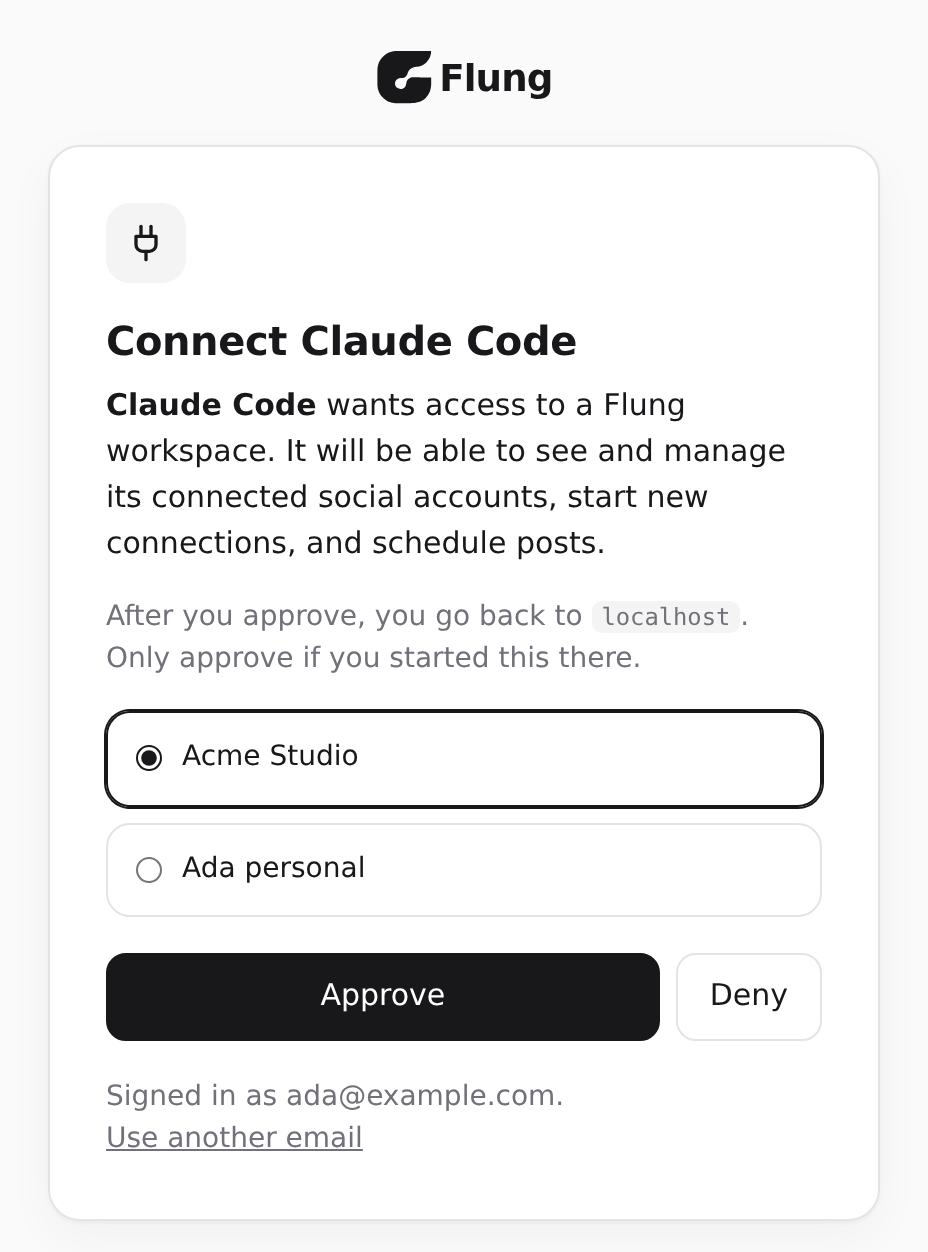
Claude acts as you, in that workspace: it sees the accounts and posts you can, and it schedules posts in your own time zone. To take its access away, open Connected apps (opens in a new tab) and choose Disconnect beside Claude Code.
The skills
Claude picks a skill from what you ask, so you can say what you want in your own words. You can also run one by name, with what it should do after it.
| Skill | Use it to |
|---|---|
/flung:post | Draft and schedule a post to your connected accounts, now or at a time you name. |
/flung:connect | Connect or reconnect an account, and keep each brand's accounts apart. |
/flung:release-post | Turn a release of the repository you are in into a post per platform. |
/flung:status | See what is scheduled, what failed, and which accounts need reconnecting. |
Post
Ask for a post in plain words, with the time as you would say it:
Post that our docs site is live to X and LinkedIn tomorrow at 9am.| Claude calls | For |
|---|---|
get_time | Your time zone and today's date there, so "tomorrow" is your tomorrow. |
list_profiles | The brand to post as, when there is more than one. |
list_accounts | Your active X and LinkedIn accounts. |
list_platforms | Each platform's character limit and media rules. |
Then it shows you the drafts and waits:
Here are the drafts, for Tuesday 3 November at 09:00 your time (Australia/Brisbane):
X, @acme (80 characters):Our docs are live: guides, API reference and MCP tools. https://docs.example.com
LinkedIn, Acme Inc (110 characters):Our docs site is live: every guide, the API reference and the MCP tools in one place. https://docs.example.com
Schedule these, change them, or stop?
On your yes it calls schedule_post, with the X text as an override and publishAt as the local time you said, 2026-11-03T09:00, with no offset. Flung turns that into UTC in your zone, so Claude never works out a time itself. It confirms the time back in your zone, and for a post sent now it checks each account with get_post and gives you the links.
Connect
Connect our LinkedIn company page and Bluesky for the Acme brand.| Claude calls | For |
|---|---|
list_profiles | The Acme brand, or create_profile to add it. |
list_accounts | What Acme already has. A brand holds one account per platform. |
connect_account | A consent link for each platform. A broken account gets reconnect_account instead, which keeps its scheduled posts. |
get_connect_session | Whether you approved, every few seconds, until it is done. |
You open each link and approve on the platform; Claude never signs in for you:
Open each link, approve, then come back. Each one lasts ten minutes.
LinkedIn company pages: https://www.linkedin.com/oauth/v2/authorization?...Bluesky: https://bsky.social/oauth/authorize?...
Acme now has LinkedIn (Acme Inc, Acme Labs) and Bluesky (@acme.bsky.social), all active.
Release post
In a repository, name the tag, or leave it out for the latest:
/flung:release-post v1.4.0Claude reads what the release changed with read-only git and gh commands: the tag before it, the GitHub release notes, the section of CHANGELOG.md, or the commit subjects between the two tags. With Conventional Commits it leads with feat and fix and leaves out chore, ci and test. Then it drafts a post per platform as in the release workflow below, and asks before scheduling.
Status
/flung:statusClaude calls get_time and review_workspace for the next seven days, and answers with the most urgent first:
Needs you now- Instagram @acme needs reconnecting. Thursday's 18:00 post to it will fail until then.
Reconnect soon- LinkedIn Acme Inc, by Thursday 12 November.
Failed- "Our autumn range is here" went out on X; Instagram failed (reconnect required).
Scheduled (next 7 days, Europe/Athens)- Wed 4 Nov 09:00, X and LinkedIn: "Three ways to..."- Thu 5 Nov 18:00, Instagram: "Behind the scenes..."
Reconnect Instagram now? Once it is back I can retry the failed post.
It changes nothing until you pick a fix. Accounts that renew themselves are not listed as a warning.
The release workflow
From a tag to scheduled posts, with you approving each step.
1. Tag or release
Make the release in Claude Code as you always do, or ask Claude to:
git tag -a v1.4.0 -m "v1.4.0"git push origin v1.4.0gh release create v1.4.0 --generate-notes2. The hook suggests
When the command succeeds, the hook gives Claude this note, and Claude offers you one line once the release work is done:
Flung: the command just made the release v1.4.0. Once the release work is done, offer the person one short line: the flung:release-post skill can draft a post per platform from this release for them to review. Do not draft, schedule or publish anything unless they say yes.Say yes, or run /flung:release-post v1.4.0 at any time later.
3. A draft per platform
Claude reads the release, picks the two or three changes a user cares about most, and writes each platform's post within its limit, counting the link in full. A short post leads with the one change that matters; LinkedIn gets a first line that stands alone, a paragraph on why it matters, and a short list:
v1.4.0 is out: build --watch rebuilds as you save, Node 24 is supported, and file order holds on Windows.https://github.com/acme/tool/releases/tag/v1.4.0Version 1.4.0 of Acme Tool is out.
The build command can now watch your files and rebuild as you save, so the edit and check loop is one step.
Also in this release:- Node 24 is supported- File order is kept on Windows
Release notes: https://github.com/acme/tool/releases/tag/v1.4.0Every claim comes from the changelog, the release notes or the commits. Internal ticket numbers, private names and secrets files stay out.
4. Approve
Change what you like, then say when:
Schedule both for tomorrow at 10am.5. Scheduled in your time zone
Claude makes one call, with each platform's text and the time as you said it. The idempotencyKey names the release, so a retry never posts twice:
{ "name": "schedule_post", "arguments": { "content": "Version 1.4.0 of Acme Tool is out.\n\nThe build command can now watch your files and rebuild as you save, so the edit and check loop is one step.\n\nAlso in this release:\n- Node 24 is supported\n- File order is kept on Windows\n\nRelease notes: https://github.com/acme/tool/releases/tag/v1.4.0", "accountIds": [ "acct_aaaaaaaaaaaaaaaaaaaaaaaa", "acct_bbbbbbbbbbbbbbbbbbbbbbbb" ], "platformOverrides": { "x": { "content": "v1.4.0 is out: build --watch rebuilds as you save, Node 24 is supported, and file order holds on Windows.\nhttps://github.com/acme/tool/releases/tag/v1.4.0" } }, "publishAt": "2026-11-03T10:00", "idempotencyKey": "release-v1.4.0" }}Flung answers with publishAt in UTC, publishAtLocal and timeZone, and Claude tells you the local one:
Scheduled for Tuesday 3 November at 10:00 Australia/Brisbane, on X and LinkedIn.The zone is yours, from your Account page in Flung, never the clock of the machine Claude runs on. Time zones says how a local time is read, and what happens when the clocks change.
The hook
After each Bash command Claude runs, the hook reads that one command. When it made a release (git tag <name>, or gh release create <tag>) and succeeded, the hook adds the note above. Listing or deleting tags, failed commands and everything else get no answer, so it is silent in normal work. It never calls Flung and never schedules anything.
To turn it off, set FLUNG_HOOKS to off in the shell you start Claude Code from, or in your Claude Code settings:
export FLUNG_HOOKS=off{ "env": { "FLUNG_HOOKS": "off" }}The skills work the same with the hook off.
Privacy
| Question | Answer |
|---|---|
| Is a key stored? | No. The plugin holds no API key and stores nothing. Claude Code keeps the OAuth sign-in, and you can end it in Connected apps (opens in a new tab). |
| What does the hook read? | Only the text of the command Claude just ran. It reads no file, calls nothing and sends nothing. |
| What does the plugin send? | Nothing by itself. Claude calls the Flung MCP server when a skill or your request needs it, with what that call needs: post text, media links, account and brand ids. |
| What does the release skill read? | The changelog, release notes and commit subjects of the repository you are in, with read-only commands. Never .env or other secrets files. |
| Who handles the data? | Flung, under its privacy policy. Nothing is sold, used for advertising, or used to train AI models. |
Troubleshooting
| You see | Do |
|---|---|
flung says Needs authentication in /mcp | Pick it and choose Authenticate, then sign in in the browser. |
| Claude signed in to the wrong workspace, or keeps failing to sign in | In /mcp, pick flung and clear its authentication, then authenticate again. Disconnecting it in Connected apps (opens in a new tab) has the same effect. |
| Two sets of Flung tools | The server was also added by hand. Remove that one with claude mcp remove flung. |
| Mastodon will not connect | Mastodon needs your own server's address, which the tools cannot pass. Connect it in the Flung portal at app.flung.dev (opens in a new tab), then come back to Claude. |
An account needs_reconnect | Ask "Reconnect my Instagram", or run /flung:connect. Sign in as the same platform user. |
A refusal such as plan_limit_reached | It is an answer: Claude gives you the upgrade link and schedules nothing else. |
| The hook never suggests | It needs Node 18 or newer on your path, and FLUNG_HOOKS not set to off. |
Update and uninstall
Plugins from a marketplace update when Claude Code refreshes it. To fetch the latest now:
/plugin marketplace update flungTo remove the plugin, and then its marketplace:
/plugin uninstall flung@flung/plugin marketplace remove flungUninstalling leaves your posts, accounts and brands in Flung as they are. To end Claude's access too, disconnect it in Connected apps (opens in a new tab).
See also
| Link | Why |
|---|---|
| flung-official/flung-claude-plugin (opens in a new tab) | The plugin's source, its changelog, and issues for bugs and ideas |
| Connect an AI agent | The same server in other clients, and with an API key |
| Ways to use Flung | The plugin, the MCP server, the API and SDK, and webhooks, side by side |
| Prompts and recipes | More to ask, and the tool behind each |
| MCP tools | Every tool and workflow Claude can call |